
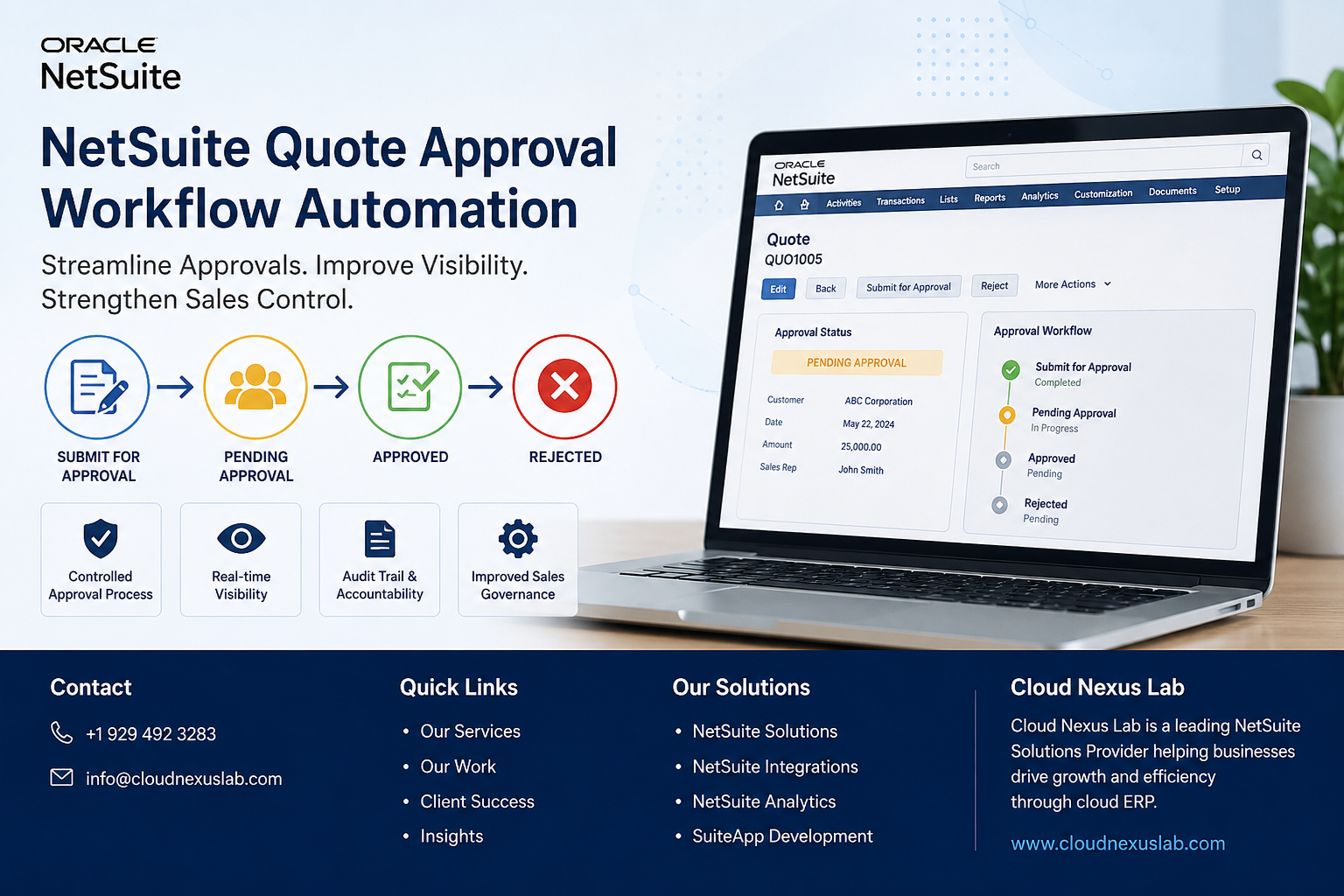
Why Businesses Need a Quote Approval Process
In many organizations, sales teams generate customer quotes every day. While speed is important, so is accuracy and proper oversight.
Without a structured approval process, quotes can be sent to customers without proper review, leading to:
- Incorrect pricing being shared with customers
- Unauthorized discounts or special terms
- Limited visibility into who approved what
- Difficulty tracking approval history
- Inconsistent sales processes across teams
- Reduced management control over customer-facing quotations
To solve these challenges, Cloud Nexus Lab implemented a customized Quote Approval Workflow in NetSuite that guides every quote through a controlled approval lifecycle before it can move forward in the sales process.
How NetSuite Helps
NetSuite provides powerful workflow capabilities that allow businesses to automate approvals and control record movement through different stages.
However, many organizations require more than a basic approval process. Common requirements include:
- Custom approval statuses
- Submit for Approval functionality
- Approval and rejection actions
- Dynamic button visibility
- Controlled workflow transitions
- User-specific approval permissions
- Better visibility into approval progress
To meet these requirements, we designed and implemented a tailored Quote Approval Workflow that aligns with real-world business processes.
The Solution
The workflow automates and manages the complete approval lifecycle of a Quote, ensuring that every quotation follows a standardized review process before reaching customers.
The solution controls:
- Approval status updates
- Submission for approval
- Pending approval tracking
- Approval and rejection actions
- User interface behavior
- Workflow transitions
- Approval visibility and accountability
This creates a consistent and auditable process for managing customer quotations.
Workflow States
The approval process includes the following workflow states:
- Set Approval Status
- Submit for Approval
- New Customer
- Pending Approval
- Approved
- Rejected
- Approved Customer
Each state performs specific actions and determines how the Quote progresses through the approval cycle.
How the Workflow Works
1. Initial Approval Status
When a new Quote is created, the workflow automatically assigns an initial approval status.
This ensures that every Quote enters the approval process with consistent settings and tracking.
Key actions include:
- Initializing approval status
- Assigning default workflow values
- Preparing the record for approval submission
2. Submit for Approval
When the sales representative is ready for review, they can submit the Quote for approval.
At this stage, the workflow:
- Updates the status to Pending Approval
- Clears previous rejection information if applicable
- Records workflow ownership information
- Displays approval-related actions
The workflow also manages the user experience by:
- Displaying the appropriate action buttons
- Restricting unauthorized changes
- Preventing unwanted processing during approval review
This helps ensure that Quotes remain controlled throughout the approval cycle.
3. Pending Approval
Once submitted, the Quote enters the Pending Approval stage.
During this phase:
- The Quote awaits managerial review
- Approval status remains visible to users
- Progress can be tracked directly within NetSuite
- Processing is paused until a decision is made
This provides transparency and keeps everyone informed about where a Quote stands.
4. Approved
When an approver reviews and approves the Quote, the workflow automatically:
- Updates the approval status to Approved
- Records the approval outcome
- Moves the transaction to the next stage
- Allows downstream business processes to continue
This confirms that all required reviews have been completed successfully.
5. Rejected
If the Quote requires changes or does not meet approval requirements, it moves to the Rejected state.
The workflow:
- Updates the status to Rejected
- Captures rejection information
- Notifies users of the outcome
- Allows revisions and resubmission
This prevents unsuitable quotations from progressing further while maintaining a clear audit trail.
6. New Customer Processing
Some organizations require additional validation when Quotes are created for new customers.
To support this, the workflow includes dedicated logic for new customer scenarios.
This enables:
- Additional review steps
- Customer-specific approval requirements
- Enhanced validation controls
As a result, businesses can apply different approval rules where necessary.
7. Approved Customer
After all customer-related requirements have been satisfied, the Quote can move into the Approved Customer state.
This indicates that:
- Customer validation has been completed
- Approval conditions have been met
- The Quote is ready for the next phase of the sales cycle
Example Approval Flow
Step 1: A sales representative creates a new Quote.
Step 2: The workflow automatically assigns the initial approval status.
Step 3: The user clicks Submit for Approval.
Step 4: The Quote moves to Pending Approval.
Step 5: The designated approver reviews the Quote.
Step 6: Based on the review:
If Approved:
- Status changes to Approved
- Quote proceeds to the next stage
If Rejected:
- Status changes to Rejected
- Feedback is provided
- User can update and resubmit the Quote
Step 7: Approved Quotes continue through the sales process.
Key Features
- Automated Quote Approval Workflow
- Approval Status Management
- Submit for Approval Functionality
- Pending Approval Tracking
- Approval and Rejection Handling
- Workflow State Management
- Dynamic Button Visibility
- User Interface Controls
- Controlled Sales Approval Process
- Improved Approval Transparency
Business Benefits
Implementing this workflow provides several important advantages:
Better Governance
Ensures every Quote follows the same approval process before reaching customers.
Increased Visibility
Sales teams and managers can easily track approval status and progress.
Reduced Risk
Prevents unauthorized pricing, discounts, or terms from being shared externally.
Improved Auditability
Maintains a clear history of approvals, rejections, and workflow actions.
Process Consistency
Standardizes Quote management across teams and departments.
Reduced Manual Follow-Up
Automates status updates and approval routing, saving valuable time.
Results
By implementing this customized NetSuite Quote Approval Workflow, organizations gain greater control over their quotation process while improving visibility, accountability, and operational efficiency.
Sales teams can move quickly while management maintains confidence that every customer-facing Quote has been properly reviewed and approved.
Conclusion
At Cloud Nexus Lab, we help organizations extend NetSuite beyond standard functionality by designing workflows that align with real business requirements.
This Quote Approval Workflow demonstrates how automation can improve governance, reduce risk, and create a more efficient sales approval process without adding unnecessary complexity for end users.
Whether your organization needs quote approvals, purchase approvals, customer onboarding workflows, or complex business process automation, our team can help build scalable NetSuite solutions that support your growth.