
Introduction
Running an eCommerce business today is exciting but let’s be honest, it can also get messy behind the scenes. Orders come in from Shopify, inventory needs constant updates, and financial data has to be accurate in NetSuite. If these systems don’t talk to each other properly, you end up doing a lot of manual work, and that’s where problems start.
This is exactly why Shopify Integration with NetSuite has become so important for growing businesses.
Shopify is built for selling it’s simple, fast, and great for managing your online store. NetSuite, on the other hand, is designed to handle your backend operations like accounting, inventory, and reporting. When these two are connected, your business runs smoother. Orders flow automatically, inventory stays updated, and your financial data becomes reliable.
In simple terms, integration removes the chaos and replaces it with control.
Shopify Integration with NetSuite: Key Methods
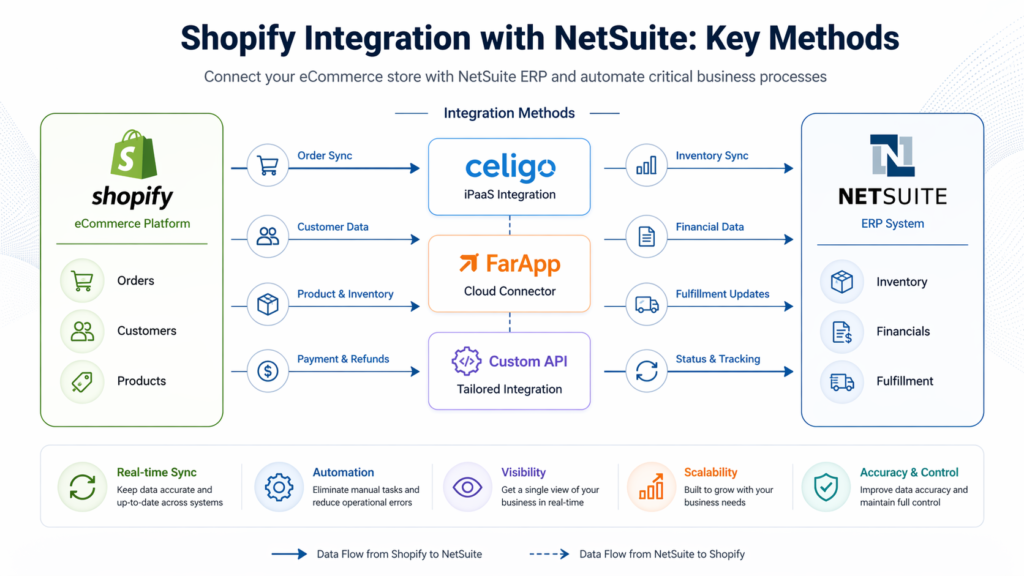
There’s no one-size-fits-all approach when it comes to integration. The right method depends on how your business operates. Let’s break down the main options in a practical way.
1. Celigo (iPaaS Integration)
If you’re looking for something that “just works” without heavy development, Celigo is often the go-to option.
Think of Celigo as a ready-made bridge between Shopify and NetSuite. It comes with pre-built flows, so you don’t have to start from scratch.
What it helps you do:
- Automatically push orders from Shopify to NetSuite
- Sync inventory so you don’t oversell
- Send tracking details back to customers
Why businesses like it:
- Fast setup
- Minimal technical effort
- Reliable for day-to-day operations
Where it may fall short:
- Limited flexibility if your processes are very unique
2. FarApp Integration
FarApp is a bit more flexible compared to Celigo. It’s useful when your business has slightly more complex requirements.
It allows you to customize how data flows between systems, which is helpful when standard templates don’t fully match your needs.
What it helps you do:
- Handle large volumes of orders
- Apply custom logic during data sync
- Manage more detailed workflows
Why businesses choose it:
- Better control over integration behavior
- Works well for mid-level complexity
Challenges:
- Setup can take longer
- Usually needs technical support
3. Custom API Integration
Now this is where things get fully tailored.
A custom API integration is built specifically for your business. Nothing is pre-defined you design everything based on your exact requirements.
What it helps you do:
- Build completely custom workflows
- Handle unique pricing or order logic
- Integrate with multiple systems beyond Shopify
Why companies go this route:
- Total flexibility
- Perfect fit for complex operations
But keep in mind:
- It takes time
- It costs more
- You’ll need ongoing maintenance
Comparing Shopify Integration with NetSuite: Pros, Cons, and Best Fit
Let’s make this simple and practical.
Celigo – The Quick Starter
Good if you want:
- Fast results
- Less technical headache
- A proven solution
Not ideal if:
- Your workflows are highly customized
FarApp – The Balanced Option
Good if you want:
- More flexibility than Celigo
- Control over data flow
Not ideal if:
- You want something plug-and-play
Custom Integration – The Power Move
Good if you want:
- Full control
- Unique workflows
Not ideal if:
- You’re looking for a quick or low-cost solution
Choosing the Right Shopify Integration with NetSuite: Key Considerations
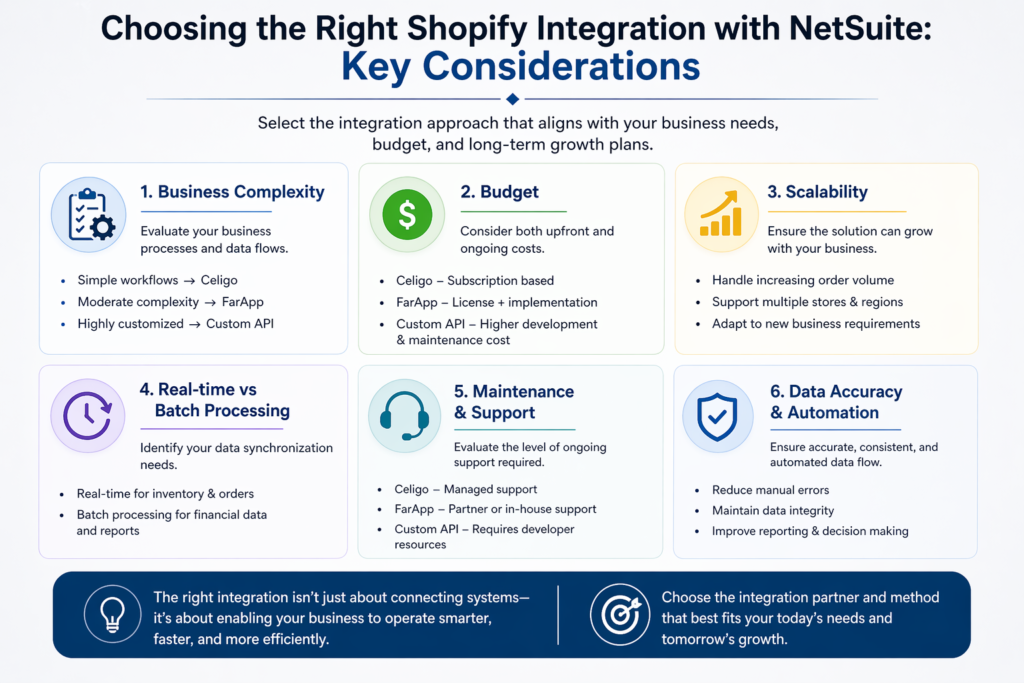
Before choosing any solution, it’s important to step back and look at your business realistically.
1. How complex is your business?
- Simple store → Celigo works great
- Growing operations → FarApp fits better
- Complex workflows → Custom integration is the way
2. What’s your budget?
Be honest here.
- Celigo = predictable subscription
- FarApp = moderate investment
- Custom = higher upfront + maintenance
3. Are you planning to scale?
This is where many businesses make mistakes.
If you’re planning to:
- Expand to multiple stores
- Increase order volume
- Add new sales channels
Then your integration should be ready for that growth.
4. Do you need real-time data?
For example:
- Inventory → should be near real-time
- Financial reports → can be scheduled
Understanding this helps you choose the right setup.
5. Who will manage it?
This is often overlooked.
- Celigo → easier to manage
- FarApp → needs some expertise
- Custom → requires a developer or partner
6. Accuracy matters more than speed
Automation is great but only if it’s accurate.
A good integration should:
- Eliminate manual errors
- Keep data consistent
- Make reporting trustworthy
FAQs
1. What does Shopify Integration with NetSuite actually do?
It connects your online store with your ERP system so that data like orders, inventory, and customers sync automatically.
2. Will this reduce manual work?
Yes, significantly. Most repetitive tasks like order entry and inventory updates become automated.
3. Can I avoid overselling products?
Yes. With proper inventory sync, your stock levels stay updated across both systems.
4. Is it safe to integrate these systems?
Absolutely, as long as it’s implemented correctly using secure APIs or trusted platforms.
5. Do I need a developer for this?
- Not always (Celigo is user-friendly)
- But for complex setups, having an expert helps a lot
Conclusion
At the end of the day, Shopify Integration with NetSuite is not just about connecting two systems—it’s about making your business easier to run.
When done right, it saves time, reduces errors, and gives you a clear view of what’s happening in your business. Whether you choose Celigo, FarApp, or a custom solution, the goal is the same: smooth operations and better control.
The key is choosing what fits your business not what works for someone else.
If you’re still unsure, it’s always a smart move to work with experts who understand both Shopify and NetSuite deeply.
At Cloud Nexus Lab, we help businesses like yours build integrations that actually work in real-world scenarios—not just on paper. From quick setups to fully customized solutions, we focus on making your operations simpler, smarter, and scalable.